 Plan revision
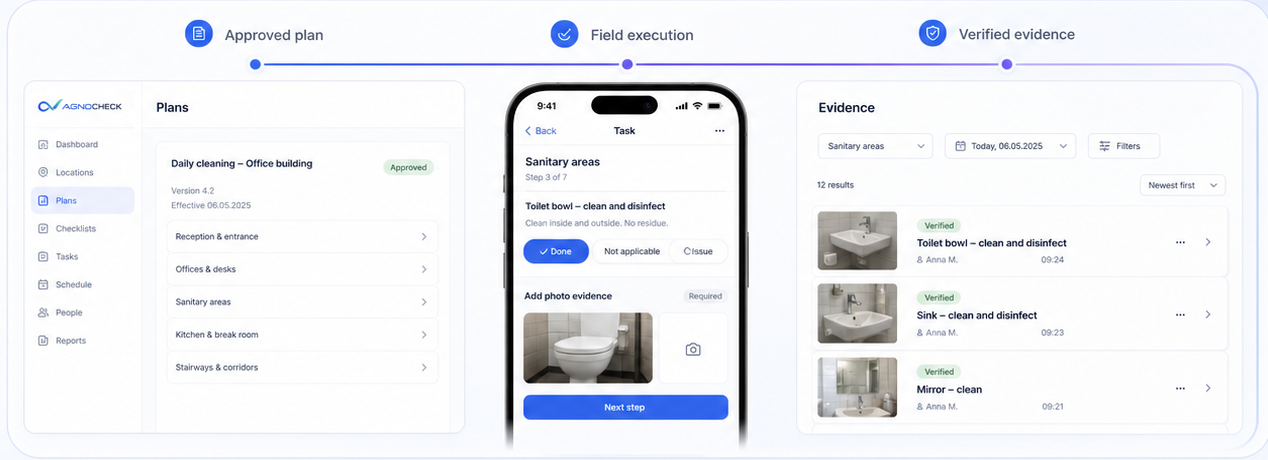
Revision 4.2 approved
Daily cleaning · Office buildingVersion4.2
Replaces4.1
LanguageEnglish
Historical evidencePreserved

Build controlled plans, guide work on any phone, capture evidence, manage approvals and see where quality needs attention.
 Browser-based
 Offline capable
 Role-based
 German and English
 Fully traceable
 Plans and standards
Create revision-controlled cleaning plans with flexible schedules, task frequencies, required evidence, resources, assignments and multi-stage approvals.
 Draft
Draft Review
 Approved
 ActivePlan revision
 Schedule rules
 DailyEvery day
 WeeklyEvery Monday
 MonthlyDay 1 of the month
 On demandAs needed
 Approval route
 PreparedCleaning team leadDoneReviewedFacility managerDone
 ApprovedQuality managerDone
 Included capabilities
 Master data
Keep PPE, cleaning agents, equipment, numbering rules and standard approval routes consistent across the workspace.
 Define once
 Reuse in plansGovern centrally
 PPE catalogue
 Protective glovesApproved resource12 items
 Cleaning agents
 Neutral cleanerDosage plan attached24 items
 Equipment
 Microfibre systemReusable standard18 itemsDefault route
 Supervisor → CustomerWorkspace defaultActive
 Controlled numberingCustomers, plans, evidence and complaints
 Workspace quality settingsShared quality and qualification rulesIncluded capabilities
 Mobile execution
Cleaners open the current plan by QR code, identify themselves with a personal PIN and complete only the tasks due for that visit.
 Scan QR
 Identify
 Complete due tasks
 Sync
Sync Current visit
 Clean conference table
 Empty bins
 Refill soap dispensersVacuum reception area
 Guided taskNot completed
 Offline & syncEncrypted offline modeWorking securely offlineActive
 Automatic uploadSynchronises when connectedPending
 Conflict checkNo duplicates detectedClearIncluded capabilities
 Evidence and approvals
Keep person, time, plan revision, answers, photos, decisions and customer response together in one traceable record.
 Capture
 ReviewApprove
 Customer response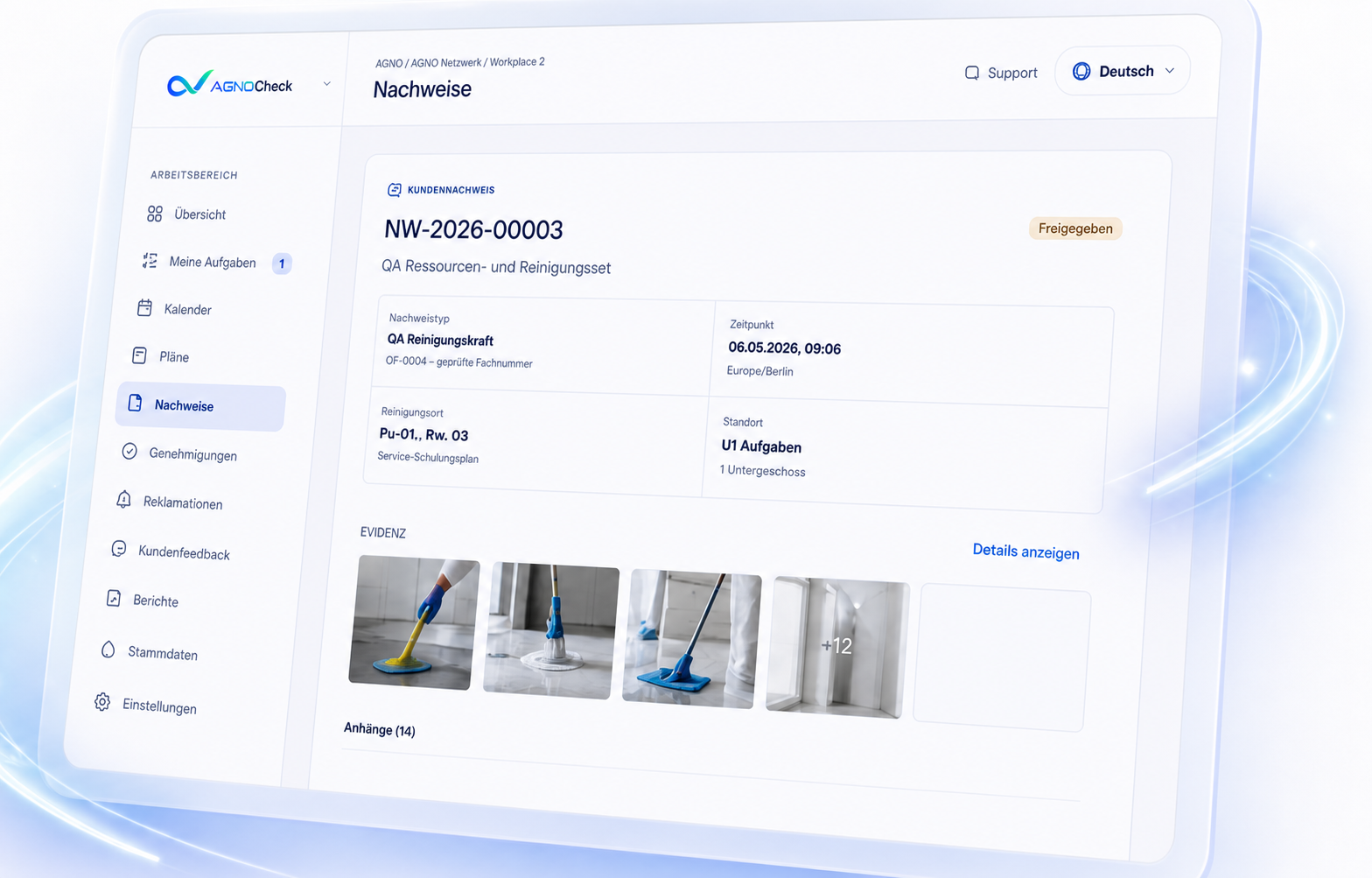
 TraceabilityDecision pathSupervisor reviewEvidence completeApproved
 Customer acceptanceSecure review routeShared
 Audit exportCSV evidence and decisionsIncluded capabilities
 Complaints and improvement
Link complaints to the original evidence, assign rework and show customers how the issue was resolved.
Report AssignReworkClose
 Linked recordIn progress
 Corrective actionResponsible cleanerRework assignedAssigned
 New evidenceRequired after reworkOpenAudit historyEvery status change retainedIncluded capabilities
 Dashboards and tasks
See upcoming work, open approvals, deviations, punctuality, complaints and recurring quality problems in one place.
 Detect
 Understand
 ActMy tasksApprove evidence8 open recordsReview complaints3 need attention
 Quality hotspot
 Quality overviewThis monthIncluded capabilitiesCustomers, objects and contracts
Connect customers and objects with plans, teams, evidence, complaints and contract requirements.
Connect ReviewApprove
 Create planContract requirementsOffice_Berlin.pdf
 Daily sanitary-area cleaningService requirementMatchedPhoto after each visitEvidence requirementMatchedSupervisor approval in 24 hReview conditionCondition
 Object record
 Plan preparationRequirements reviewedResources and evidence comparedReady
 Create plan draftKeep human approval in controlAvailableIncluded capabilities
 Preview: Automated contract requirement preparation and source review.
 People and roles
Give managers, cleaners, teams and customers exactly the access they need without exposing unrelated data.
 ManagementCleaners
 Teams
Teams Customers
 Identity types
 Management accountEmail and password
 Cleaner identityEmployee ID and PINCustomer accountSelected objects only
 PermissionsPlans and executionEvidence and approvalsComplaintsAdministration
 Views and responsibility
 Work viewSimplified field executionFocusedFull QM viewPlanning, control and analyticsCompleteTeam responsibilityLeaders, members and objectsIncluded capabilities
 Qualifications
Manage certificates, expiry dates, role requirements, reminders and optional safety-critical assignment checks.
Define MonitorCheck assignmentCertificatesControlled previewChemical handlingValid until 12 Nov 2026ValidMachine operationExpires 28 Aug 2026Due soonSafety inductionValid until 04 Feb 2027Valid
 Reminder rules
 Assignment check
 Missing critical evidenceWarn or block the assignmentOptionalIncluded capabilitiesStatus: Available in controlled preview.
 Workspace and billing
Start with a separated company workspace, manage access and upgrade when the team is ready.
 Create workspaceComplete onboarding
 Upgrade when readyCompany workspaceSeparatedOnboardingGuided free onboardingContinue to the first evidence record
 Billing
 Subscription overviewPayment, term and current plan
 Billing portalManage upgrades when readyAvailableIncluded capabilities
 API and MCP
Use approved operational data in other systems through read-only REST API and MCP connections.
 Authenticate
 Read approved data
 Connect systemsRead-only REST API7 endpoints
{
"workspace": "agno-facility",
"status": "approved",
"object": "berlin-office",
"records": [{
"id": "NW-2026-00003",
"plan_revision": "4.2",
"photos": 3,
"accepted": true
}]
} Shown onceFull token visible only at creation
 Rotate or revokeKeep access under controlPrivate by design
 Excluded dataPrivate contacts, uploads and review tokensProtected
 Stateless MCP7 read-only toolsAvailableIncluded capabilitiesStatus: Available in controlled preview.
Start with one plan, one object and one team.